


OFFICE 365 - How to access your Microsoft services
INTRODUCTION
This document explains how authorized users of the University of Coimbra can authenticate themselves in order to use Microsoft Office 365 products.
All professors, technical staff and students who have their situation regularized at the University of Coimbra are eligible to use these products.
The authentication password is the same as that used to access the UC applications (Inforestudante/Infordocente, Lugus, etc...). The username is formed by uc+nº mecanográfico+@uc.pt, in the case of teachers and technical staff, and by uc+nº student+@student.uc.pt, in the case of students:
|
user type |
Format |
Username example |
|
Teachers and technical staff |
ucXXXXX@uc.pt |
uc12345@uc.pt |
|
students |
ucXXXXXXXXXX@student.uc.pt |
uc0123456789@student.uc.pt |
How to access Microsoft Office 365
1. Access the official Microsoft Office 365 authentication address: https://portal.office.com
2. In the field dedicated to the email address, enter the username , as shown in the example below
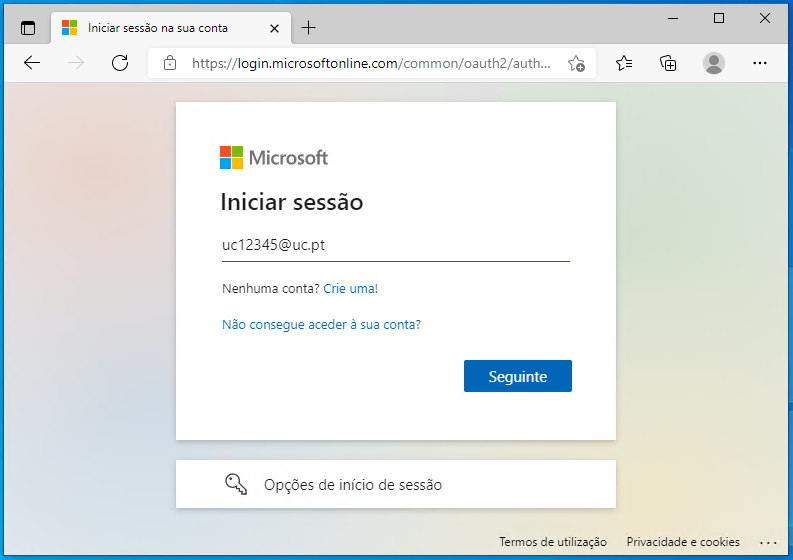
3. Click Next
4. In the next step, you will be automatically forwarded to the authentication page of the University of Coimbra

5. To proceed to Office365, you must agree to the sharing of the username field and the respective Identifier , by clicking Yes, proceed to Office365

6. On the University of Coimbra authentication page, you must enter your username and password .

7. You must select the option "Yes" or "No", depending on whether or not you want to keep the session logged in.

8. After successful authentication, you will have access to your Microsoft Office365 applications

9. As a good practice, we always advise you to End Session , in order to carry out your work
